
8 W Game – New Gaming Platform for Android Users 2026
Just Now
10.5MB
v2.1.67
Android5+
7888K+
Description
The mobile gaming world is constantly introducing new platforms designed to give Android users convenient access to different types of entertainment. 8 W Game is one such name that users may come across when searching for a modern mobile gaming experience. Its simple concept, smartphone-friendly access, and range of gaming possibilities can make it an interesting option for users who prefer playing directly from their Android devices.
For many users, choosing a mobile gaming platform is not only about the number of games available. A smooth interface, straightforward navigation, quick account access, device compatibility, and clear platform information can all influence the overall experience. This is why people often search for detailed information before installing an APK or creating an account.
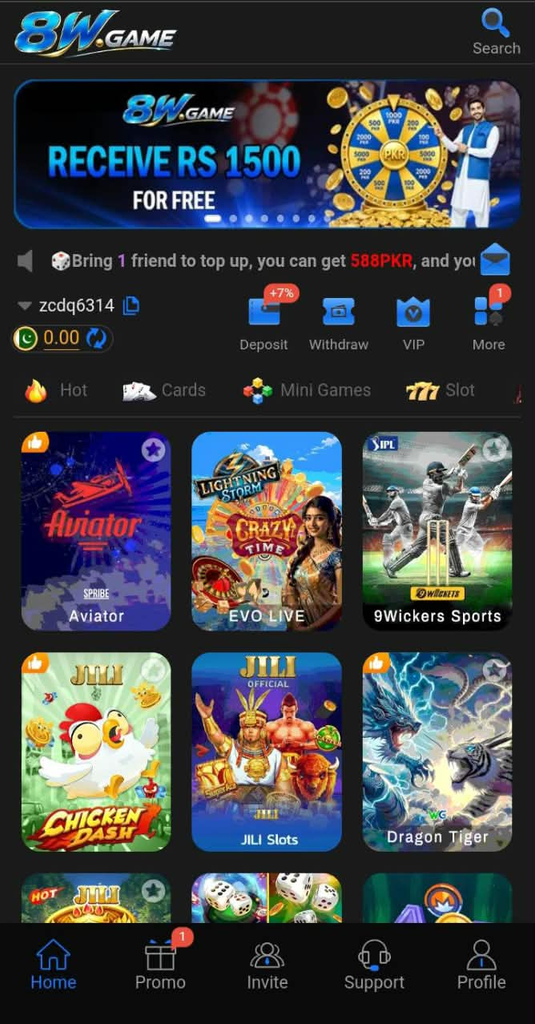
This guide explains the 8 W Game, its possible features, installation process, account setup, gameplay environment, security considerations, and useful tips for a better mobile experience. The purpose is to provide a clear overview so users can understand the platform before deciding whether it suits their preferences. Must Try: 999Q Game
What Is 8 W Game?
8 W Game is a mobile-oriented gaming platform designed for users who want to explore entertainment options through an Android smartphone. Instead of depending on a desktop computer, users can access a mobile-friendly environment directly from their device.
The platform may appeal to users who value convenience and quick access. A smartphone can be carried almost anywhere, allowing users to open their preferred gaming environment whenever they have a suitable internet connection.
Another reason people search for 8 W Game is its APK-based accessibility. Android users commonly look for APK versions when a gaming platform is not distributed through the standard app marketplace.
A Smartphone-Focused Gaming Experience
Mobile gaming has become popular because users do not need expensive equipment to enjoy digital entertainment. A compatible Android phone and a stable internet connection can be enough for many lightweight gaming platforms.
The 8 W Game experience can therefore be viewed from a mobile-first perspective, where easy navigation and responsive controls are important parts of the overall design.
Why Users Explore New Gaming Platforms
Gamers often look beyond familiar applications because they want different interfaces, new entertainment choices, or alternative mobile experiences. A new platform can also attract users who prefer a simple layout instead of an overcrowded application.
Before choosing any platform, however, users should examine its available information, terms, privacy practices, and download source.
Main Features of 8 W Game
A gaming platform becomes more attractive when its important functions are easy to understand. While specific features can vary depending on the current version, users generally look for several core elements when exploring 8 W Game.
Easy Mobile Navigation
A clean interface can make a major difference for new users. Menus, game categories, account sections, and other options should ideally be arranged in a way that does not require extensive learning.
Simple navigation helps users spend less time searching for functions and more time exploring the platform.
Android-Friendly Accessibility
One of the major advantages of mobile gaming is accessibility. Android smartphones are available in many different specifications, so platforms designed for mobile users generally need to maintain a practical balance between performance and visual quality.
Users should check whether their phone meets the requirements of the particular APK version before installation.
Variety of Entertainment Options
Gaming platforms can become more engaging when they provide different categories rather than focusing on a single style of entertainment. Users may prefer exploring several options from one application instead of downloading numerous separate apps.
The available selection can change with updates, so users should always review the current version for accurate information.
Account-Based Features
Some mobile gaming platforms provide account systems that allow users to manage their profile and platform activity. Registration may require basic information, depending on the application’s current requirements.
Users should avoid entering unnecessary personal information and should only provide details through trusted and secure channels.
How 8 W Game Works on Android
The basic mobile experience is generally designed around quick access. After installation, users may open the application, review its interface, and explore the available sections.
A stable internet connection can be important because online gaming platforms may rely on remote servers to load content and process account-related functions.
Smooth Interface and Quick Access
A well-structured interface can make an application feel easier to use. Buttons should be recognizable, menus should remain understandable, and important sections should not be hidden behind complicated navigation.
For mobile users, these details matter because smartphone screens provide less space than desktop displays.
Compatibility With Different Devices
Android phones differ significantly in processing power, storage, screen resolution, and operating-system versions. Before installing an APK, users should confirm that their device is compatible with the application’s requirements.
Keeping Android updated can also improve general security and application compatibility.
How to Download 8 W Game APK
Users searching for 8 W Game download should pay close attention to the source of the APK. APK files obtained from unknown websites can potentially contain modified or harmful software.
The safest approach is to use an official or otherwise trusted distribution source whenever one is available.
Downloading the APK Safely
Before downloading, check the following points:
- Confirm that the application name matches the intended platform.
- Check whether the download source is trustworthy.
- Review the APK version and update information.
- Avoid suspicious pop-ups and misleading download buttons.
- Keep your Android security features active.
- Do not install files that request unnecessary permissions.
A legitimate-looking website does not automatically guarantee that every APK hosted there is safe.
Check the File Before Installation
If an APK comes from a source outside the official app ecosystem, users should take additional precautions. Android security tools can help identify potentially harmful files.
It is also useful to check the file size and version information against the publisher’s available details.
How to Install 8 W Game on Android
Installing an APK can be straightforward, but users should understand each step before proceeding.
Step 1: Download the Correct APK
First, obtain the appropriate APK version from a source you trust. Avoid downloading multiple files with similar names because modified copies can create confusion.
Step 2: Review Android Security Settings
Depending on the Android version and installation method, the device may display a warning about installing applications from outside the official store.
Only proceed when you are confident about the source and understand the permissions being requested.
Step 3: Start the Installation
Open the downloaded APK file and follow the Android installation prompts. Wait until the process completes rather than opening or moving the file during installation.
Step 4: Launch the Application
Once installed, open 8 W Game and review the initial interface. If the platform requires registration, follow its official account-creation instructions.
Creating an Account on 8 W Game
If registration is available, users should carefully review the information requested during account creation.
A strong password is recommended, particularly if the account contains personal information or connects with other services.
Choose a Strong Password
Avoid simple passwords based on names, birthdays, phone numbers, or common words. A longer combination of letters, numbers, and symbols generally provides stronger protection.
Never share your password through social media messages or unofficial support channels.
Protect Your Login Details
Account credentials should remain private. If a website or individual asks for your password, payment PIN, or security code without a clear legitimate reason, treat the request cautiously.
Exploring the 8 W Game Interface
A useful gaming platform should allow users to understand its main sections without unnecessary complexity.
After logging in, users can review the homepage, available game categories, account settings, and support information.
Homepage Layout
The homepage generally acts as the starting point for discovering available content. Promotional banners, categories, featured games, or navigation buttons may appear depending on the current version.
Users should avoid clicking unfamiliar advertisements or external links.
Game Categories
Organizing games into categories makes browsing easier. Instead of scrolling through a long list, users can look for the type of entertainment they prefer.
The exact categories can change as the platform receives updates.
8 W Game Performance on Mobile Devices
Performance depends on multiple factors, including the smartphone’s hardware, operating system, available storage, and internet connection.
A modern Android device with sufficient free storage can generally provide a more comfortable experience than an older phone with limited resources.
Improve Mobile Performance
Users can improve their general gaming experience by:
- Closing unnecessary background applications.
- Keeping sufficient storage space available.
- Updating Android when appropriate.
- Using a stable internet connection.
- Avoiding excessive device overheating.
- Installing applications only from reliable sources.
These steps can benefit mobile performance beyond a single gaming application.
Internet Connection and 8 W Game
Online platforms often depend on a stable connection. A weak or inconsistent network can cause slow loading, interruptions, or connection errors.
Wi-Fi may be preferable when available, while mobile data can be useful when traveling.
What to Do When the Game Loads Slowly
If the platform becomes slow, users can first check their internet connection. Restarting the router or switching networks may help identify whether the issue is network-related.
If other applications work normally but the game continues to experience problems, checking for an application update may be worthwhile.
8 W Game Updates and New Versions
Application updates can introduce interface improvements, bug fixes, compatibility changes, and other adjustments.
Users should avoid downloading every new APK from random sources simply because it is labeled as an update.
Why Updates Matter
An updated application can potentially offer better compatibility and stability. Updates may also address technical issues discovered in earlier versions.
Before installing a new version, users should verify the source and make sure the file corresponds to the intended application.
Security Tips for 8 W Game Users
Security should always remain an important part of the mobile gaming experience. APK applications require particular attention because Android allows installations from sources outside the official store under certain conditions.
Download From Reliable Sources
The source of an APK matters. Avoid websites that use aggressive redirects, fake download buttons, or suspicious files.
A trusted source should clearly identify the application and provide understandable information about the version.
Protect Personal Information
Do not provide unnecessary personal information. If a platform requests sensitive details, read its privacy policy and understand why the information is required.
Users should also avoid storing unnecessary payment information inside unfamiliar applications.
Keep Your Device Protected
Use Android’s built-in security features and maintain your device software. A secure phone provides an additional layer of protection when installing and using applications.
Responsible Use of 8 W Game
If the platform includes games involving money or paid participation, users should approach those features carefully. Entertainment should not interfere with essential expenses or financial responsibilities.
Never treat gaming as guaranteed income. Outcomes can be uncertain, and promotional language should not be interpreted as a promise of profit.
Set Clear Personal Limits
Users can make their experience more manageable by deciding how much time and money, if any, they are comfortable spending.
If an activity stops feeling like entertainment and begins causing financial or emotional pressure, taking a break is a sensible choice.
Advantages of Exploring 8 W Game
There are several reasons mobile users may be interested in exploring a platform such as 8 W Game.
Convenient Smartphone Access
A mobile-first approach means users can access the platform without depending on a desktop computer.
Simple Digital Experience
Users often prefer platforms where important functions are easy to find and understand.
Multiple Entertainment Possibilities
If different game categories are available, users can explore more than one type of digital entertainment from a single platform.
Flexible Mobile Usage
A smartphone can provide access from different locations, provided that the application works with the device and the user has an appropriate internet connection.
Things to Check Before Using 8 W Game
Before downloading or registering, users should review several important points.
Verify the Official Source
Always try to identify the legitimate publisher or official distribution channel. This reduces the chance of installing a modified application.
Read the Terms
Terms and conditions can explain account requirements, restrictions, promotions, withdrawals, and other platform rules.
Review Privacy Information
A privacy policy can help users understand what information may be collected and how it is handled.
Understand Any Payment Conditions
If the platform includes financial transactions, read all applicable conditions before making a payment. Do not rely solely on promotional claims.
8 W Game Common Problems Users May Face
Like many mobile applications, 8 W Game may encounter technical issues depending on the device or network.
Common problems can include:
- Installation failure
- Application crashes
- Slow loading
- Login difficulties
- Network interruptions
- Outdated APK versions
- Device compatibility issues
The first troubleshooting steps should include checking the internet connection, restarting the application, freeing storage, and confirming that the installed version is compatible with the device.
Why Users Search for 8 W Game Download
Search interest around mobile gaming platforms often comes from users looking for quick Android access, new entertainment options, or updated application versions.
However, downloading an APK should never be based only on search ranking. Users should evaluate the source, file authenticity, security, and platform information before installation.
A reliable download decision is more important than simply finding the fastest available link.
8 W Game for New Android Users
Beginners should take a few minutes to understand the application before using advanced features.
Start by exploring the interface, checking the available settings, reading the rules, and learning how account functions work.
Start With Basic Navigation
New users do not need to explore everything immediately. Understanding the homepage, game categories, account area, and support section is a good starting point.
Learn Before Spending
If any feature involves payments, users should understand its rules and conditions first. Never make a transaction simply because an offer appears attractive.
Final Words
8 W Game represents the type of mobile gaming platform that Android users may explore when searching for a convenient digital entertainment experience. Its appeal can come from smartphone accessibility, straightforward navigation, and the possibility of exploring different gaming options through one mobile environment.
At the same time, downloading and using any APK requires responsible decision-making. Users should verify the source, check application permissions, protect their login information, and review the platform’s terms before creating an account or making any transaction.
For the best experience, focus on security, responsible usage, device compatibility, and reliable information rather than downloading an APK simply because it appears in search results. With these precautions in mind, users can make a more informed decision about whether 8 W Game fits their mobile gaming preferences.
FAQs
8 W Game is a mobile-focused gaming platform that Android users can explore for digital entertainment and different gaming options through a smartphone.
Users should download the 8 W Game APK only from a trusted and verified source. Before installation, check the file version, publisher information, and required permissions.
The platform is designed around mobile access, making Android devices the primary environment users may consider. Compatibility can depend on the Android version and device specifications.
Yes, users who are new to mobile gaming platforms can start by exploring the homepage, menus, game categories, account settings, and available support information.
Safety depends largely on the APK source and how the application is used. Users should choose reliable download sources, avoid suspicious files, protect account credentials, and review privacy and platform terms before using it.